Scheduling that catches conflicts before they cost you
Home care scheduling is where margins live or die. Overtime creep, missed shifts, wrong-caregiver matches, and stale availability data quietly cost agencies tens of thousands a year. BridgeCare OS ships drag-and-drop scheduling, intelligent client-caregiver matching, open-shift broadcasting, overtime guards, and live visit monitoring — included on every plan.
What it is: the operational heart of a home care agency — assigning caregivers to clients, managing shift swaps and call-outs, controlling overtime, broadcasting open shifts.
What BridgeCare ships: drag-and-drop calendar, client-caregiver matching algorithm, open-shift broadcasting with auto-fill, overtime guards, real-time visit monitoring, payroll export.
Why it matters: the difference between an agency that runs on time and one that loses 20% of margin to overtime, missed visits, and wrong matches comes down to whether the scheduler can see and act in real time.
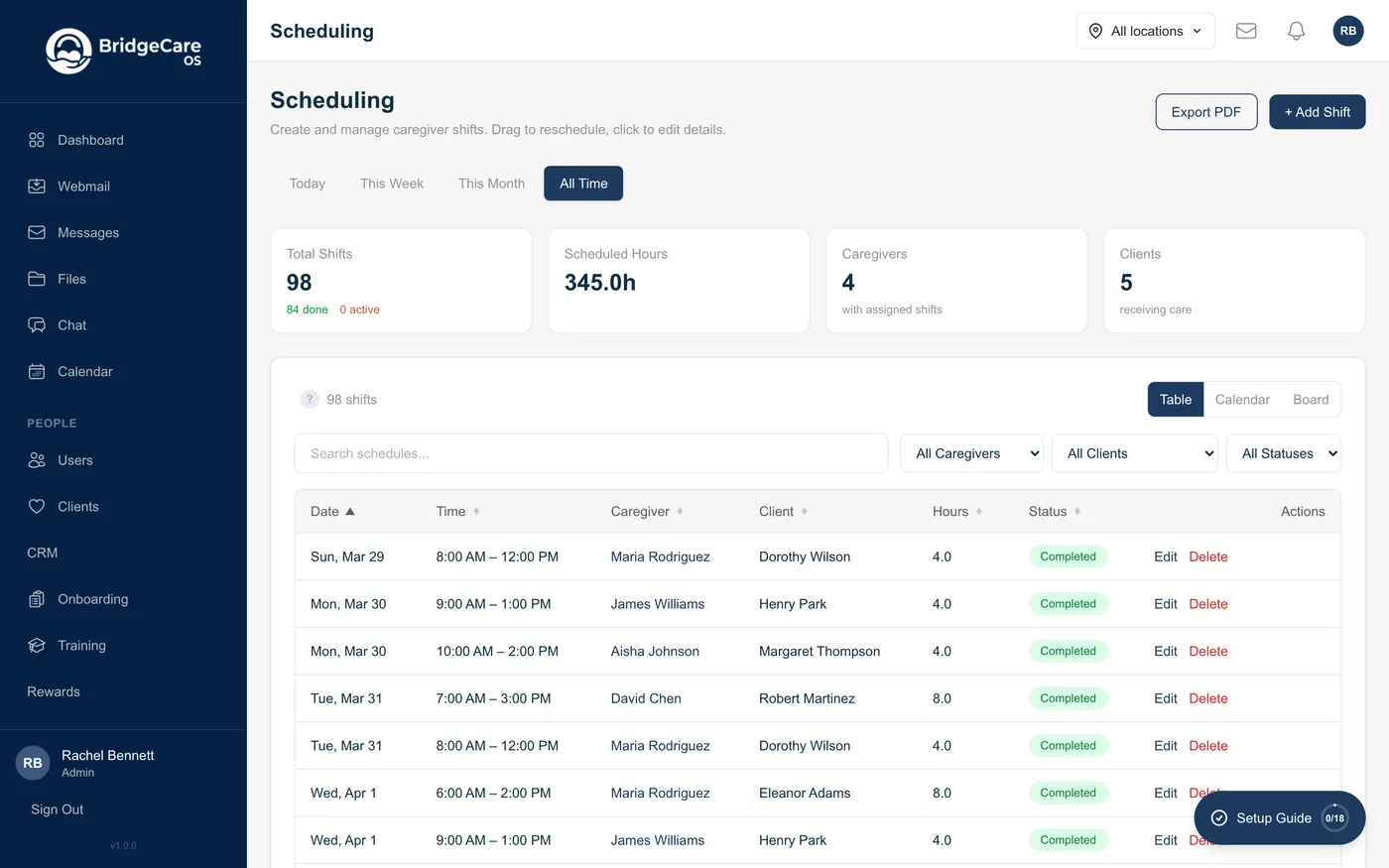
What the scheduler does in BridgeCare OS
Drag-and-drop calendar
Day, week, and month views. Drag a visit from unassigned to a caregiver — system instantly checks availability, overtime, skills, geography.
Smart matching
Score caregivers on certifications, language, preferences, geography, and historical compatibility. See the top three picks for any open visit.
Open-shift broadcast
Push + SMS notification to eligible caregivers. First eligible accept wins. Auto-expire avoids stale notifications.
Overtime guards
Live weekly-hours tracking per caregiver. Warnings before assignments push into overtime. End-of-week proactive rebalancing reports.
Shift swaps
Caregivers can swap with peers or post to the open board. Rules (notice period, dispatcher approval, eligibility) configurable per agency.
Live visit monitoring
See every active visit, caregiver location vs geofence, clock-in status, and any alerts on one screen.
Mileage tracking
Automatic mileage from caregiver's previous visit (or home base). Reimbursement workflows for IRS-compliant payouts.
Payroll export
Approved visit time + mileage + overtime flows to QuickBooks, ADP, or Gusto. Split-week boundaries configurable.
Multi-location
Per-location scheduling, with location-scoped admin permissions. One agency, many offices, clean separation.
How a good scheduling day actually goes
Walk through what a 7 AM-to-7 PM dispatcher day looks like with BridgeCare OS:
- 7:00 AM — Dispatcher opens the calendar. The night-shift had two call-outs. Both are visible at the top of the dashboard as unassigned visits with red badges.
- 7:02 AM — Dispatcher clicks the first unassigned visit. BridgeCare OS shows the top three eligible caregivers ranked by skill match, geographic proximity, and overtime headroom. Broadcast to all three.
- 7:05 AM — Caregiver accepts via mobile push. Visit auto-assigns. Family portal updates in real time so the patient's daughter sees the new caregiver name.
- 7:30 AM — Live monitoring shows three caregivers en route. One isn't moving — dispatcher pings them; turns out it's a flat tire. Dispatcher reassigns the visit to a nearby caregiver who just finished their previous client.
- 10:00 AM — Overtime warning fires for one caregiver scheduled for 4 more visits this week — dispatcher rebalances two of those visits to peers under their weekly cap.
- 4:00 PM — Late-cancel from a client. Caregiver already en route — system pings them immediately to abort. Cancellation logged for billing review.
- 6:30 PM — Tomorrow's schedule is already 100% filled because last night's auto-fill worked. Dispatcher reviews exceptions, signs off, goes home.
The point isn't drama. The point is most of these moves happen automatically; the dispatcher's job is exceptions, not data entry.
Why agencies care
Overtime is the silent margin killer
Home care payroll is a high-percentage cost. Even a 5% overtime rate can erase a quarter's profit. BridgeCare OS surfaces overtime risk in real time so dispatchers can rebalance before the week closes — not after payroll runs.
Wrong matches drive client churn
The first 30 days of a client-caregiver relationship are the highest churn risk. Matching on skills + language + preferences + geographic proximity makes that first match more likely to stick, which is where retention compounds.
Open-shift broadcasting beats phone-tree filling
Old workflow: dispatcher calls down a list of caregivers. New workflow: push notification + SMS to every eligible caregiver simultaneously. The first eligible accept wins. Fill times drop from 40+ minutes to under 5.
Frequently asked questions
What does home care scheduling software do?
Assigns caregivers to client visits, manages shift swaps and call-outs, tracks caregiver availability and overtime, matches clients with the right caregiver, and broadcasts open shifts. Strong platforms also handle mileage, routing, and live visit monitoring.
How does BridgeCare OS schedule a visit?
Drag the visit from unassigned to a caregiver. System instantly checks availability, overtime status, skill match, geography, and compatibility. Conflicts surface immediately; alternates suggested if needed.
What is client-caregiver matching?
Finding the best caregiver for each client based on certifications, language, preferences, geography, and historical compatibility. BridgeCare OS scores candidates and surfaces the top three for any new onboarding or shift fill.
How do open shifts get filled?
Push + SMS broadcast to eligible caregivers. First eligible accept wins. If no one accepts within the configurable window, dispatcher alerted. Auto-expire avoids stale notifications.
How does BridgeCare OS control overtime?
Live weekly-hours tracking per caregiver, warnings before assignments push into overtime, end-of-week proactive rebalancing reports. Overtime-eligible assignments require explicit acknowledgment.
Does scheduling integrate with payroll?
Yes. Approved visit time (with EVV-captured clock-in/out) flows to QuickBooks, ADP, or Gusto. Mileage and overtime calculated automatically.
Can caregivers swap shifts on their own?
Yes — within rules the agency sets. Caregivers can swap with specific peers or post to the open-shift board. Approval rules configurable.
What if a client cancels a visit?
Cancellation recorded with reason and timestamp. Late cancellations flagged for billing review. Caregiver notified immediately so they don't drive to the visit.
Related features
Electronic Visit Verification · Agency Command Center · Caregiver mobile app · Communication hub · Live GPS map