The caregiver app that doesn't need the App Store
Most home care software ships native iOS and Android apps. That sounds modern, but it's the single biggest reason caregivers don't actually use the app. Find it. Download it. Update it. Sign in. Wait. The BridgeCare OS caregiver experience is a Progressive Web App — caregivers tap a link, pin it to their home screen, and it looks and works like a native app. Zero install friction, instant feature updates.
What it is: the caregiver-facing mobile app for BridgeCare OS — a Progressive Web App that installs on iOS, Android, and Web from a URL, no App Store download required.
What's included: schedule, clock-in/out with EVV, care documentation, shift swaps, secure agency messaging, photo capture, pay stubs, availability. Works offline for core workflows.
Why it matters: caregiver adoption of the mobile app is the strongest predictor of EVV compliance, accurate documentation, and ultimately caregiver retention. Reduce the install friction, raise adoption.
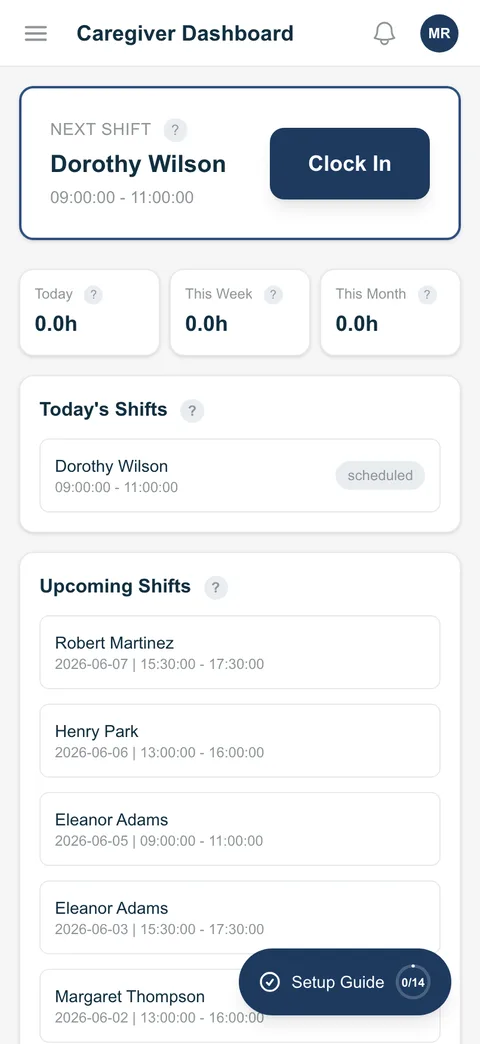
What caregivers do in the app
Today's schedule
Visits in chronological order with patient details, care plan link, address, and driving directions.
Clock-in / clock-out
EVV captured automatically — GPS, geofence, timestamp. Telephony fallback for low-signal areas.
Care documentation
Task checklists, free-text notes, observations. Configurable per care plan template.
Photo capture
Attach photos to a visit when agency policy allows (wound documentation, completed tasks). Encrypted in transit and at rest.
Secure messaging
Direct messages with the agency office. Not the caregiver's personal phone — agency-controlled access.
Open shift acceptance
Push notification + SMS when a shift is broadcast. Tap to accept. First eligible wins.
Shift swaps
Request a swap with a specific peer or post to the open board. Approval rules per agency.
Pay stubs & hours
Self-serve view of current pay period, recent stubs, and accumulated hours. Cuts office payroll inquiries.
Availability
Caregiver updates their own availability windows. Schedulers see it in real time.
Works offline in the field
Cell coverage in a client's home isn't guaranteed. When it drops, BridgeCare OS doesn't stop working.
Clock-ins queue on the device
If coverage drops mid-visit, clock-in and clock-out are captured locally on the device, GPS coordinates and all.
Automatic sync when back online
Queued entries sync automatically the moment the caregiver's device regains a connection, no manual re-submit.
Installable PWA, no App Store
The app installs on iOS and Android straight from the browser. No app-store download, no install limits.
Why a PWA, not a native iOS / Android app
Most home care software ships native iOS and Android apps. We made a deliberate, opposite choice.
Adoption friction kills field-staff software
Every step between "agency hired this caregiver" and "caregiver clocks into their first visit on the app" is a chance for things to break. App Store accounts, family device passwords, install limits, slow downloads, mismatched version numbers — every friction point becomes an "I'll just call the office" moment. PWAs eliminate the install step entirely: tap the URL, tap "Add to Home Screen," done.
Updates ship instantly, not on Apple's schedule
Native apps update when the user updates. PWA updates ship on next-page-load. When we improve clock-in flow or add a new care documentation field, every caregiver gets it the next time they open the app — same day. With native apps, you wait for App Store review, then for users to update.
One codebase, every platform
iOS, Android, iPad, Android tablet, Windows laptop, Chromebook — same app. Agencies don't have to think about which devices their caregivers carry. If it can run a modern browser, it runs the BridgeCare OS caregiver app.
The trade-off, stated honestly
PWAs can't do some deep native integrations — custom Apple Watch faces, complex background-task processing, certain hardware-level optimizations. None of those matter for home care visit capture. If they ever do, we'll ship a native wrapper. They don't yet.
What an actual caregiver day looks like
- 6:45 AM — Caregiver opens BridgeCare OS from their home-screen icon. Sees today's three visits.
- 7:55 AM — Arrives at first patient. Opens the visit, taps clock-in. GPS verifies they're at the patient address; EVV captured; agency dashboard updates in real time.
- 8:00–9:30 AM — Caregiver delivers care. App shows the care plan tasks; caregiver checks them off as completed.
- 9:32 AM — Caregiver adds a brief note about a small skin condition they noticed. Photo attached. Both encrypted and sent to the agency record.
- 9:35 AM — Taps clock-out. EVV captured. Visit complete.
- 9:36 AM — Family portal updates in real time so the patient's daughter sees the visit was completed and the caregiver left a note.
- 11:00 AM — Open-shift notification appears for a visit later this afternoon. Caregiver taps to accept; the visit lands on their schedule.
- 5:30 PM — End of day. Caregiver checks their accumulated hours in the app, confirms everything looks right, closes it.
Frequently asked questions
What is the BridgeCare OS caregiver mobile app?
The field-staff interface — schedule, EVV clock-in/out, care documentation, shift swaps, agency messaging, care plans, photo capture. It's a Progressive Web App that installs on iOS, Android, or Web from a URL — no App Store or Google Play download needed.
Do caregivers need to download from the App Store?
No. Open the URL in Safari (iOS), Chrome (Android), or any modern browser, then tap "Add to Home Screen." Looks and feels like a native app. No App Store account, no install limits, no slow update cycles. New features ship immediately on next open.
Does the caregiver app work offline?
Yes for the core workflow — clock-in/out, care documentation, care plan access. Data syncs when the device regains connection. Messaging and real-time updates require connection.
What can caregivers do in the app?
See visits, clock in/out with EVV, document care, take photos, send secure messages, accept open shifts, swap shifts, view pay stubs, update availability.
How does the app handle EVV?
EVV captured automatically at clock-in/out — GPS, geofence vs patient address, timestamp, caregiver identity. Telephony fallback (toll-free call-in) for low-signal or no-smartphone scenarios.
Is the caregiver app HIPAA-compliant?
Yes. TLS 1.3 in transit, field-level AES-256 at rest, role-based access controls, triple MFA at login. Caregivers only see patients they're assigned to or authorized for.
Why a Progressive Web App instead of native iOS / Android?
Less adoption friction (no App Store step), instant feature updates (no waiting for review or for caregivers to update), one codebase across iOS/Android/iPad/Android tablet/Web. Trade-off: PWAs can't do some deep native integrations — none of which matter for home care visit capture.
Which platforms work?
iOS 16+, Android 10+, and any modern desktop browser (Chrome, Safari, Firefox, Edge).
Related features
EVV clock-in/out · Scheduling · Caregiver retention · Communication hub · Training & compliance courses · See every screen in the product tour