A family portal families actually use
Adult children want real-time visibility into their parent's home care — care plan, today's visit, who's there, how it went, what to pay. Most home care software either has no family portal or charges extra for it. BridgeCare OS includes a HIPAA-ready, mobile-friendly family portal on every plan — no add-on fees, no extra license.
What it is: a secure web portal where authorized family members see real-time visit updates, care plans, caregiver messages, and billing for their loved one's care.
What's included: visit timeline, care plan visibility, caregiver photos and notes, direct messaging, invoice view + pay, multi-factor login. On every plan, no add-on fee.
Why it matters: family satisfaction is the strongest predictor of client retention in home care. Agencies with real family portals see lower office call volume, higher retention, and faster referrals.
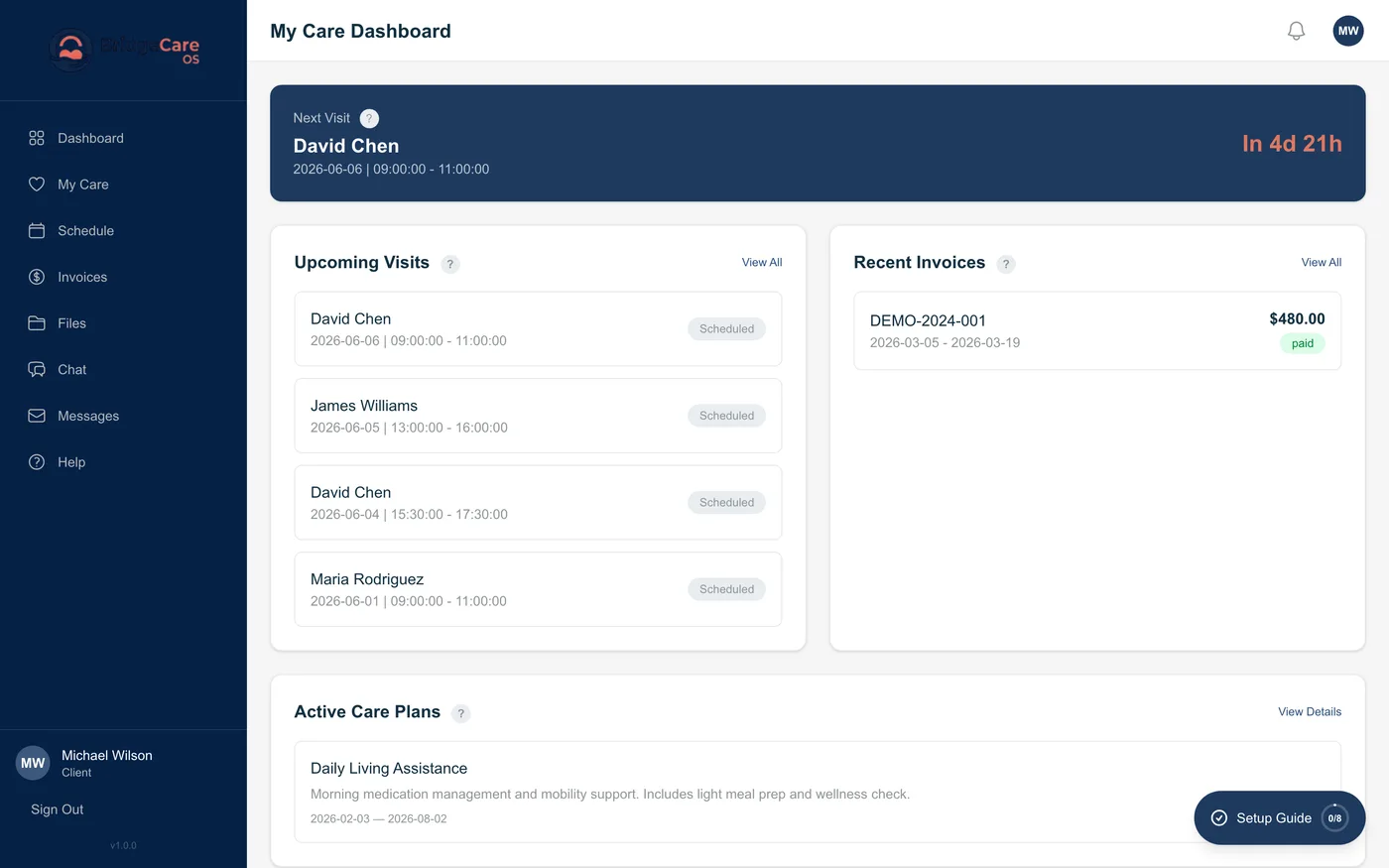
What a family member sees
The family portal is built around the questions families actually ask. Not the questions software vendors think they ask.
Today's visit
Who is scheduled, when they're arriving, whether they're en route, clocked in, or completed — updated in real time from the caregiver's mobile app.
Care plan
The current plan of care, including goals, tasks, medication reminders, and any precautions. Updates from the agency push to the family portal automatically.
Visit history & notes
Every past visit with caregiver-submitted notes, photos (if enabled), and any documentation the agency chose to share with the family.
Messages
Secure direct messaging with the agency — not the caregiver's personal phone. The agency controls which staff members can be reached.
Billing & payments
View invoices, see what's covered by insurance vs private pay, pay via Stripe, set up auto-pay. Split billing across siblings is supported.
Emergency contacts
Who to call after-hours, escalation paths, and any agency-specific guidance. One tap to call.
How agencies use it
Cuts phone-call volume to the office
The single biggest unmeasured cost in a home care agency is the volume of "did the caregiver show up?" / "what happened today?" / "can I see the invoice?" calls from families. BridgeCare OS agencies routinely report a 40–60% reduction in those calls within the first 90 days after enabling the family portal. Office staff get their day back; families get their answers faster.
Improves family satisfaction — the leading retention indicator
Home care client retention is driven by family satisfaction more than by clinical outcome scores. The adult children of the patient are usually the decision-makers and bill-payers; they want transparency, not summaries. Agencies that ship a real family portal — not a paid add-on, not a basic shared-document folder — see higher NPS from families and longer client tenure.
Closes the loop with caregivers
When the family can see the visit happen in real time, the caregiver knows their work is visible. That's a two-way accountability mechanism that improves both care quality and caregiver pride in their job. Family-portal-active agencies also tend to receive more genuine caregiver praise from families, which fuels caregiver retention.
Family portal across the home care software market (2026)
Family portals remain rare in 2026. Here's how the major platforms compare:
| Platform | Family portal | Real-time visit status | Family billing & pay | Add-on fee |
|---|---|---|---|---|
| BridgeCare OS | Included | Yes | Yes (Stripe, split billing) | $0 |
| AlayaCare | Add-on | Yes | Limited | Per-user fee |
| HHAeXchange | Add-on | Yes | Limited | Per-user fee |
| WellSky Personal Care | "Family Room" — limited | Yes | Partial (split-pay) | Included on Personal Care tier |
| AxisCare | Add-on | Yes | Limited | Per-user fee |
| CareSmartz360 | Included on some plans | Yes | Yes | Plan-dependent |
| Alora | Limited / not a primary focus | Limited | No | — |
| MatrixCare | Limited | No | No | — |
Frequently asked questions
What is a family portal in home care software?
A secure, HIPAA-compliant area of a home care agency's software where patients and their authorized family members can view real-time visit updates, care plans, caregiver schedules, billing, and exchange messages with the agency. Family portals reduce phone-call volume to the agency and dramatically improve family satisfaction — which is the strongest predictor of client retention.
Does BridgeCare OS include a family portal?
Yes. The BridgeCare OS Patient and Family Portal is included on every plan, Launch through Enterprise. No per-family add-on fees and no separate license. Families get real-time visit updates, care plan visibility, billing, and messaging from a single secure URL with multi-factor login.
Which other home care software includes a family portal?
Family portals are still uncommon in home care software in 2026. BridgeCare OS includes one on every plan. AlayaCare and HHAeXchange offer family portals as paid add-ons. WellSky has a limited family-facing surface ("Family Room") on its Personal Care product. AxisCare, Alora, CareSmartz360, and MatrixCare either don't include one or offer only a basic shared-document feature. See our full comparison.
Is the BridgeCare OS family portal HIPAA-compliant?
Yes. The family portal runs on the same HIPAA-ready infrastructure as the rest of BridgeCare OS — field-level AES-256 encryption, immutable audit trails, role-based access controls, and triple MFA. Family members only see information about loved ones they are authorized for; access is granted and revoked by the agency administrator.
Can families pay invoices through the portal?
Yes. The family portal supports invoice viewing and payment via Stripe, including split billing across multiple family members (helpful for siblings sharing a parent's care costs). Auto-pay and saved payment methods are supported. The agency configures which invoice types are family-payable.
How do families sign up for the portal?
The agency administrator invites a family member by email or SMS from inside the BridgeCare OS admin dashboard. The invite link sets the family member's password and enrolls them in two-factor authentication. Onboarding takes under two minutes per family member.
What does a family member see in the portal?
Care plan and goals, upcoming and past visits, the assigned caregiver, visit notes shared by the agency, real-time visit status (en route, clocked in, completed), care documentation, photos shared by the caregiver, secure direct messages with the agency, invoices and payment history, and emergency contacts. The agency controls visibility per family member.
Why do families value a family portal?
Family portals are the single biggest driver of family satisfaction in home care, which is in turn the strongest predictor of client retention. Adult children of aging parents — typically the decision-makers and bill-payers — want transparent, timely information without having to call the agency. Agencies that ship a real family portal see lower call volume, higher retention, and faster word-of-mouth referrals.
Related features
Caregiver mobile app · Communication hub · Scheduling · Roles & permissions · See every screen in the product tour