Catch denials before you bill
Every denied Medicaid claim is money you already earned and now have to chase. BridgeCare OS Claim Readiness runs a pre-bill audit on every completed visit — EVV completeness, authorization limits, service-code alignment, visit exceptions, and (optionally) AI documentation review — and hands your billing team a fix-these-first worklist before the claim ever reaches the payer.
What it is: an automatic pre-bill audit that scans every completed visit for the gaps that cause Medicaid claim denials and failed audits, before you submit.
What BridgeCare ships: checks for EVV completeness, prior-authorization overruns and expiry, service-code-vs-care-plan mismatches, unresolved visit exceptions, an optional AI note-vs-care-plan documentation review, and a hard guard against billing the same visit twice.
Cost: included on every plan. The optional AI documentation review uses your own AI key when you turn it on.
Why home care claims get denied
Denials in personal care and home health rarely come from exotic problems. They come from the same handful of small, fixable gaps — caught too late, after the claim is already out the door. Claim Readiness checks every one of them on every visit:
Incomplete EVV
Missing service code, client Medicaid ID, caregiver identifier, or location verification. The aggregator rejects the visit and the claim stalls.
Authorization overruns
Hours delivered past the authorized amount, or visits dated outside the authorization window. Two of the most common — and most expensive — denial reasons.
Service-code mismatch
The code captured at the visit doesn't match the client's care plan. Flagged before it becomes a coding denial.
Visit exceptions
Missed, short, or late visits that were never resolved. Surfaced against each billable visit so nothing slips through.
Documentation gaps
A visit note that doesn't evidence the care plan — or contradicts it. The quiet driver of failed audits and clawbacks.
Double-billing
The same visit landing on two claims. BridgeCare OS records which visit is on which claim and won't bill it twice.
The pre-flight check
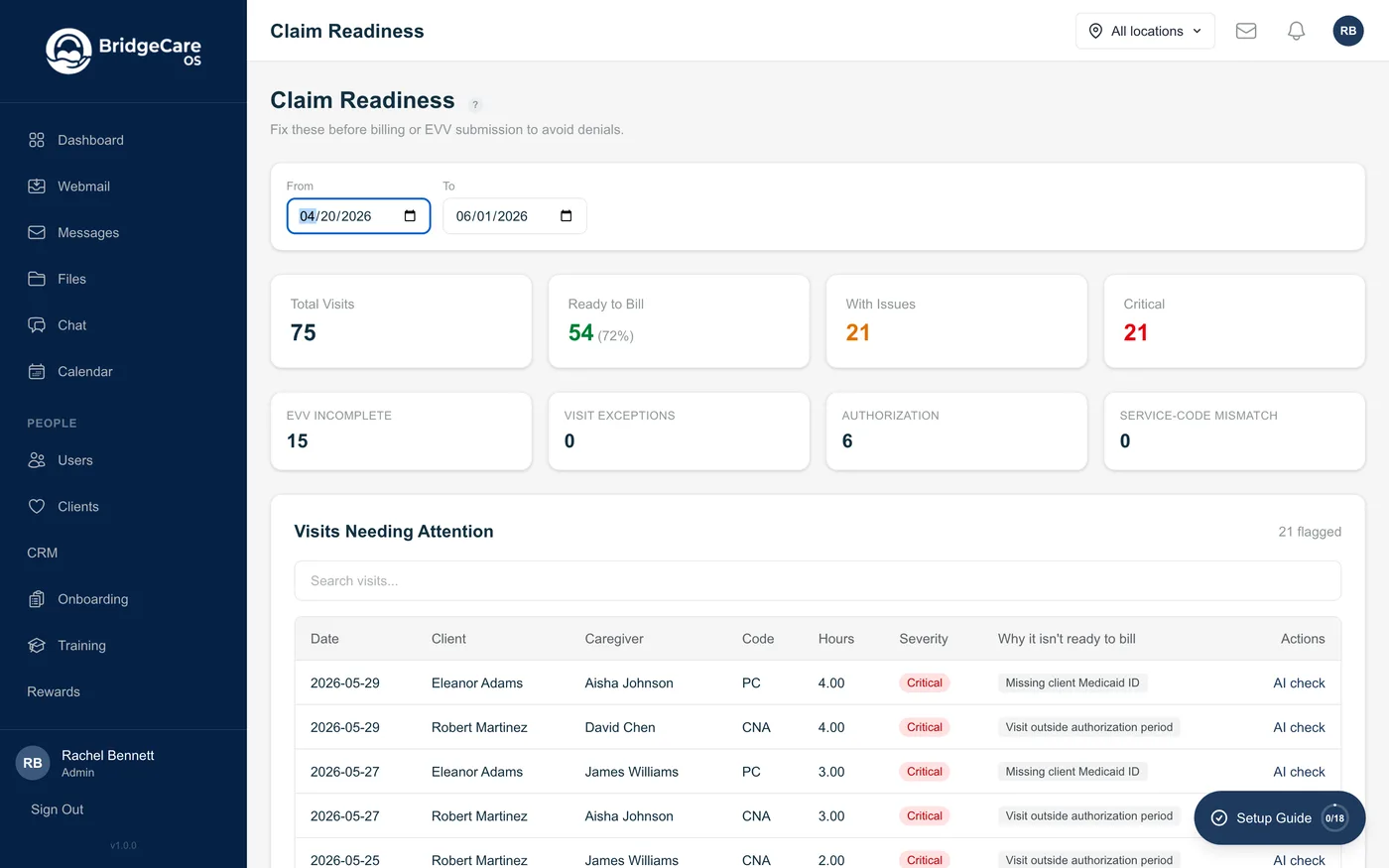
Pick a date range. BridgeCare OS scans every completed visit in it and returns a single, ranked worklist: how many visits are ready to bill, how many have issues, and exactly why — by visit, by reason, by severity.
- Ready to bill vs. needs attention. A one-glance count of how much of the period is clean, so you know your real billable total before you generate a single claim.
- Reason breakdown. Issues grouped by driver — EVV incomplete, authorization, service-code, exceptions — so a billing lead can triage the whole period in minutes.
- Per-visit detail. Each flagged visit lists its exact problems in plain language: "Missing client Medicaid ID," "Visit outside authorization period," "Authorization hours exceeded (112% used)," "Service code mismatch (visit: PC, care plan: HM)."
- Fix, then bill. Your team corrects the underlying data — add the Medicaid ID, fix the code, resolve the exception — and the visit clears. Only clean visits go to the payer.
AI documentation review
The hardest denials to prevent are documentation denials, because they hide in free text. With AI enabled for your agency, BridgeCare OS reads each visit's caregiver note against the client's care plan and returns a structured review:
- Missing documentation — planned care-plan activities the note doesn't evidence.
- Contradictions — anything in the note inconsistent with the plan or the authorization.
- Documented — what the note does support, so you can see the visit is defensible.
- Audit-risk rating — low, medium, or high, with a one-line summary.
It runs on demand, one visit at a time, and the result is cached — so it's fast, inexpensive, and uses your own AI key. The note stays inside your tenant; nothing about the client leaves the platform except the documentation-gap analysis you asked for.
Where it sits in your workflow
Claim Readiness is the checkpoint between the field and the payer. It reads the same EVV and visit data your caregivers already capture, the same authorizations your office already tracks, and the same care plans you already maintain — and turns them into a billability verdict.
| Capability | Typical platform | BridgeCare OS |
|---|---|---|
| Claim format scrubbing (837) | Often included | Included |
| Pre-bill audit of visit data | Rare | Every visit, every period |
| Authorization overrun & expiry check | Manual / spreadsheet | Automatic, per visit |
| AI note-vs-care-plan documentation review | Not offered | Optional, built in |
| Double-bill protection | Not enforced | Hard guard at the data layer |
Frequently asked questions
What causes home care Medicaid claim denials?
Most denials trace to a small set of avoidable gaps: incomplete EVV, visits that exceed or fall outside the prior authorization, service codes that don't match the care plan, unresolved visit exceptions, and missing or contradictory documentation. Claim Readiness checks every completed visit for all of these before you bill.
What is a pre-bill claim audit?
It reviews each visit for billability before the claim is generated, rather than discovering problems weeks later when the payer denies it. BridgeCare OS lists every visit with an issue, the exact reason, and a severity — so your team fixes problems while they're still cheap to fix.
Does it check prior authorization limits?
Yes. BridgeCare OS tracks each client's authorized hours and authorization window, and flags visits outside the dates plus clients whose delivered hours exceed the authorized amount — two of the most common, most expensive denial reasons in personal care.
Can AI review my visit documentation?
Optionally. With AI enabled, BridgeCare OS compares a visit note against the client's care plan and returns the planned activities not evidenced in the note, any contradictions, and an audit-risk rating. It runs on demand per visit and caches the result.
Can the same visit be billed twice?
No. BridgeCare OS records which visit is on which claim and won't put a visit on a second claim — so re-running a claim for the same client and range can't double-bill already-billed visits, protecting you from clawbacks.
How is this different from claim scrubbing?
Scrubbing checks the 837 file for formatting and coding errors at submission. Claim Readiness works earlier and deeper — it audits the underlying visit data (EVV, authorization usage, care-plan alignment, documentation) across a whole period, catching operational problems scrubbing can't see.
Does Claim Readiness cost extra?
No. It's included on every BridgeCare OS plan. The optional AI documentation review uses your own AI key when you choose to enable it; the rules-based pre-bill audit is standard.
Related features
Medicaid EDI billing · Electronic Visit Verification · AI documentation review · Best home care billing software 2026