See your whole agency in numbers, not gut feel
Most home care owners run on hunches because their data is trapped in three systems and a stack of spreadsheets. BridgeCare OS turns the data you already capture into answers — 30+ built-in report types across six categories, real-time operational dashboards, and audit-ready exports. Visits, hospitalizations, revenue, caregiver hours, EVV compliance, and ACA data all live in one place, and every report is one click from a CSV.
What it is: reporting and analytics built into the platform — 30+ report types across operational, clinical, financial, compliance, workforce, and outcomes categories, with real-time dashboards and CSV export on every report.
What it answers: are visits happening, who's at risk of hospitalization, where the money is, which caregivers are over hours, and whether you're audit-ready — all from the data you already capture.
Built for audits: ACA 1095-C data, EVV and documentation-gap reporting, and an immutable HIPAA audit trail mean you can prove compliance, not just assert it.
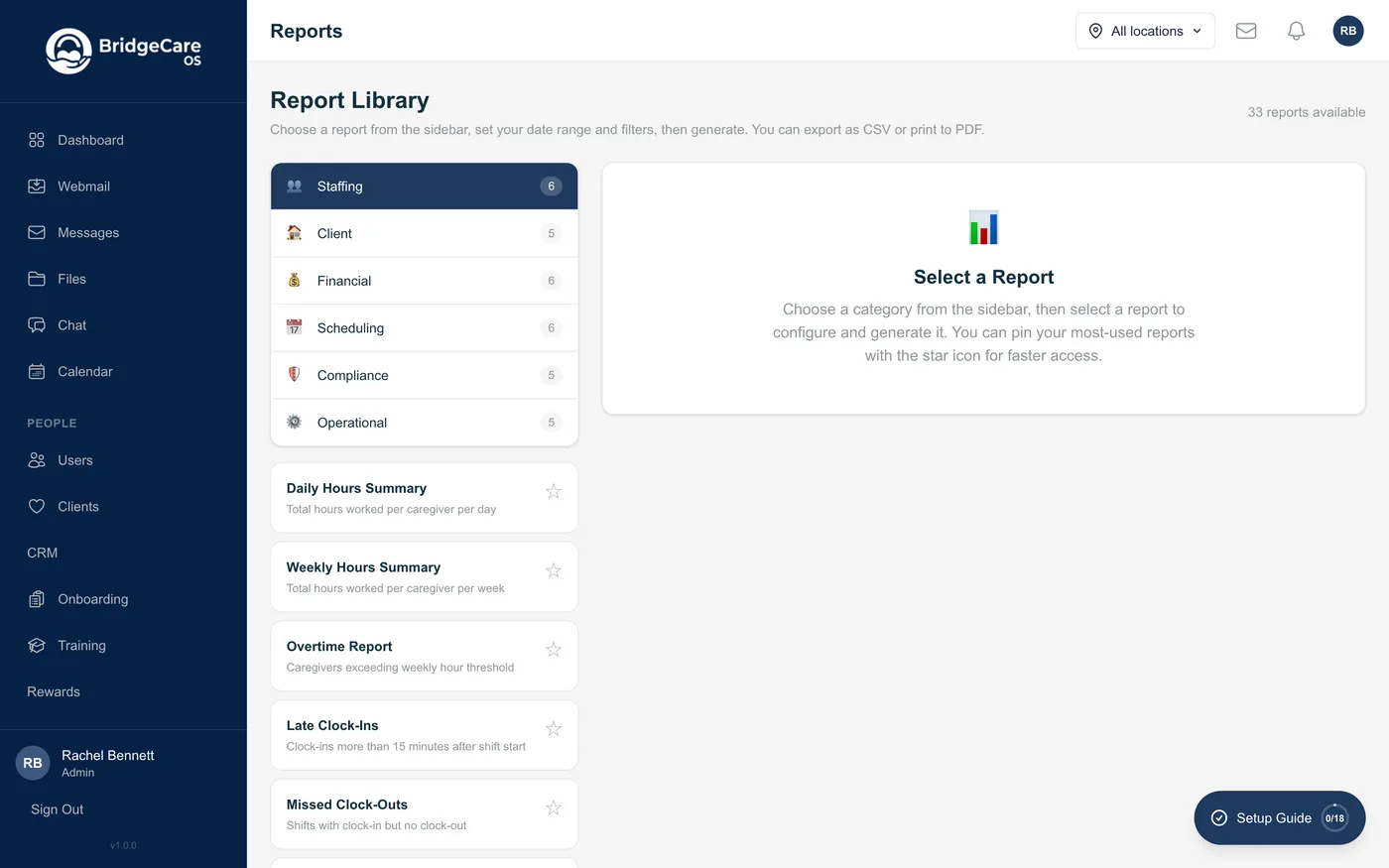
One place for every number that runs the agency
The reason most agencies fly blind isn't a lack of data — it's that the data is scattered. Scheduling lives in one tool, billing in another, payroll in a third, and the answers an owner actually needs live in the gaps between them. BridgeCare OS reports off a single source of truth, so the same visit that was scheduled, clocked, documented, and billed shows up consistently in every report.
30+ built-in report types
Operational, clinical, financial, compliance, workforce, and outcomes reports ship with the platform — no report builder to learn before you get an answer. Run visits, missed and late visits, revenue, AR aging, payroll hours, overtime, turnover, EVV compliance, and more.
Six reporting categories
Reports are organized the way an agency actually thinks — by operations, clinical care, finances, compliance, workforce, and outcomes — so the person who needs a number knows exactly where to look.
Filter by any dimension
Scope any report by date range, client, caregiver, referral source, payer, or location. The numbers change the way you'd expect, because they all come from the same underlying records.
One source of truth
Because scheduling, EVV, documentation, billing, and payroll live in BridgeCare OS, a report can't disagree with itself — the visit count in your operational report matches the one your biller works from.
Outcomes you can report, not just activity you can count
Anyone can count visits. What wins referral contracts and protects margin is being able to show outcomes and catch problems early. BridgeCare OS tracks the clinical and financial signals that matter and surfaces them where you'll act on them.
Hospitalization & outcomes tracking
See hospitalization events over time, by client, and by referral source, measured against your census. Report rates to hospital and ACO partners, spot trends, and target interventions. It pairs with the AI hospitalization-risk score — reporting shows what happened, the score helps prevent the next one.
Real-time operational dashboards
A live view of today — visits in progress, clock-ins, missed and late visits, open shifts, and pending documentation — so an administrator sees the state of the agency at a glance instead of waiting for an overnight batch.
Financial visibility
Revenue, payroll cost, accounts-receivable aging, and claim status reporting, so you know where the money is and what's stuck, by payer and by period.
Workforce reporting
Caregiver hours, overtime exposure, and turnover, so you manage labor cost and retention from numbers instead of surprises on the payroll run.
Audit-ready: compliance data and an immutable trail
In regulated home care, reporting isn't just for running the business — it's what you hand a surveyor, a payer, or an auditor. BridgeCare OS is built so the records you need already exist, organized, and exportable:
- CSV export & saved report templates — every report exports to CSV for accountants, payers, and auditors. Save the filters, date ranges, and columns you use most, so month-end and payroll reports are one click instead of a rebuild.
- ACA compliance & 1095-C data — caregiver hours, employment status, and offered coverage already live in the platform, so ACA employer-mandate and 1095-C reporting comes from real data, not a year-end spreadsheet scramble.
- EVV & documentation-gap reporting — see which visits lack electronic visit verification or complete documentation before a payer or state does, and clean them up while they're still fixable.
- Immutable HIPAA audit trail — a tamper-evident log of who accessed and changed what, when. Queryable and exportable, so you can prove PHI-access control during a survey instead of asserting it.
Pair the reporting layer with AI Insights to turn these numbers into early-warning signals, not just a record of what already happened.
Frequently asked questions
What reports does home care software include?
BridgeCare OS ships 30+ built-in report types across six categories: operational (visits, schedule adherence, missed and late visits), clinical and outcomes (hospitalizations, care-plan compliance, incidents), financial (revenue, payroll, AR, claim status), compliance (EVV, documentation gaps, expirations), workforce (hours, overtime, turnover), and ACA compliance. Every report exports to CSV.
Can I export home care data to CSV?
Yes — every report exports to CSV for an accountant, a payer, a state auditor, or your own spreadsheet model. You can also save report templates (filters, date ranges, columns) so month-end and payroll reports are one click instead of a rebuild. Exports reflect exactly what's on screen, with the same agency scoping.
Does BridgeCare OS track hospitalizations?
Yes. Hospitalization and outcomes tracking is built into reporting — by client, by referral source, and over time against your census. Report rates to partners, spot trends, and target interventions. It complements the AI hospitalization-risk score: reporting tells you what happened, the score helps prevent the next one.
Does home care reporting software handle ACA compliance?
Yes. BridgeCare OS tracks the hours and coverage data behind ACA employer-mandate compliance, including what's needed for 1095-C reporting. Because caregiver hours and coverage already live in the platform, the report comes from real data, not a year-end spreadsheet. Export it to CSV for your filing service.
Are the dashboards real-time?
Yes. Operational dashboards reflect live data — today's visits, clock-ins, missed and late visits, open shifts, and pending documentation — so you see the agency at a glance without waiting for an overnight batch. Reports can be run for any date range when you need a historical view.
Is there an audit trail in BridgeCare OS?
Yes. BridgeCare OS keeps an immutable HIPAA audit trail of who accessed and changed what, when. For a regulated agency that's the difference between asserting you control PHI access and proving it during a survey. The log is queryable and exportable, so you can produce records without engineering help.